all new finder · 1.6
Finder, reforged.
Split panes, a built-in terminal, a command palette.
A fast, lightweight native file browser for macOS.
Apple-notarized — launches right away. For auto-updates, install with Homebrew.
A featherweight native single binary · just 5.8 MB · zero telemetry · open source
Install with Homebrew.
Install with Homebrew for automatic updates — or grab the notarized .dmg with the button above.
brew tap rescenedev/anf
brew trust rescenedev/anf
brew install --cask anf
Update with brew upgrade --cask anf.
Apple-notarized — signed with a Developer ID and notarized, so it launches straight away with no Gatekeeper warning.
Optional — install fd and ripgrep for faster name/content search (falls back to Spotlight without them):
brew install fd ripgrepOptional — full rich HWP/HWPX previews (alhangeul). anf extracts the body text on its own even without it:
brew install --cask postmelee/tap/alhangeulEverything in one window.
The tools you need for working with files, brought together naturally.
Flexible split panes
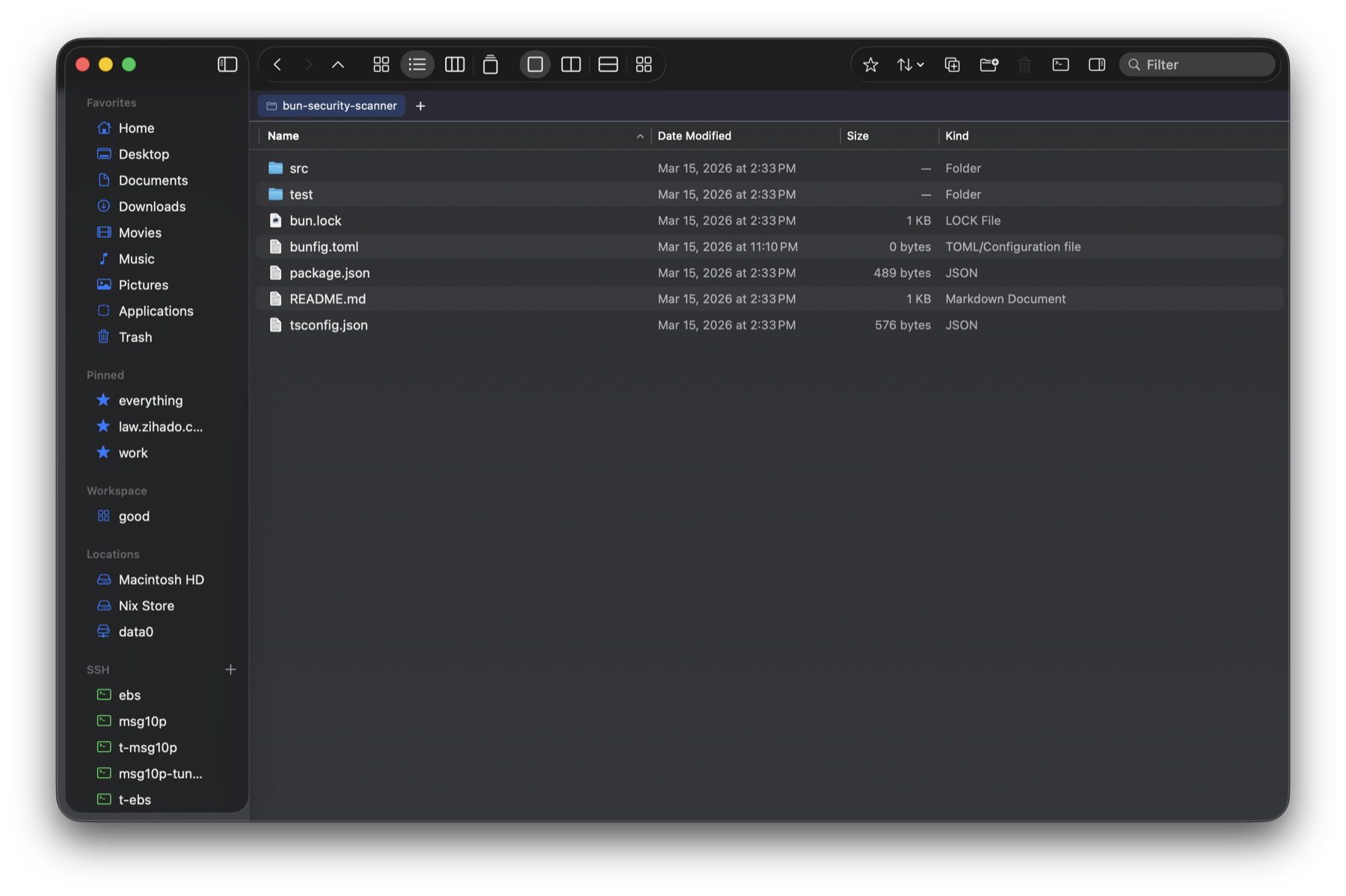
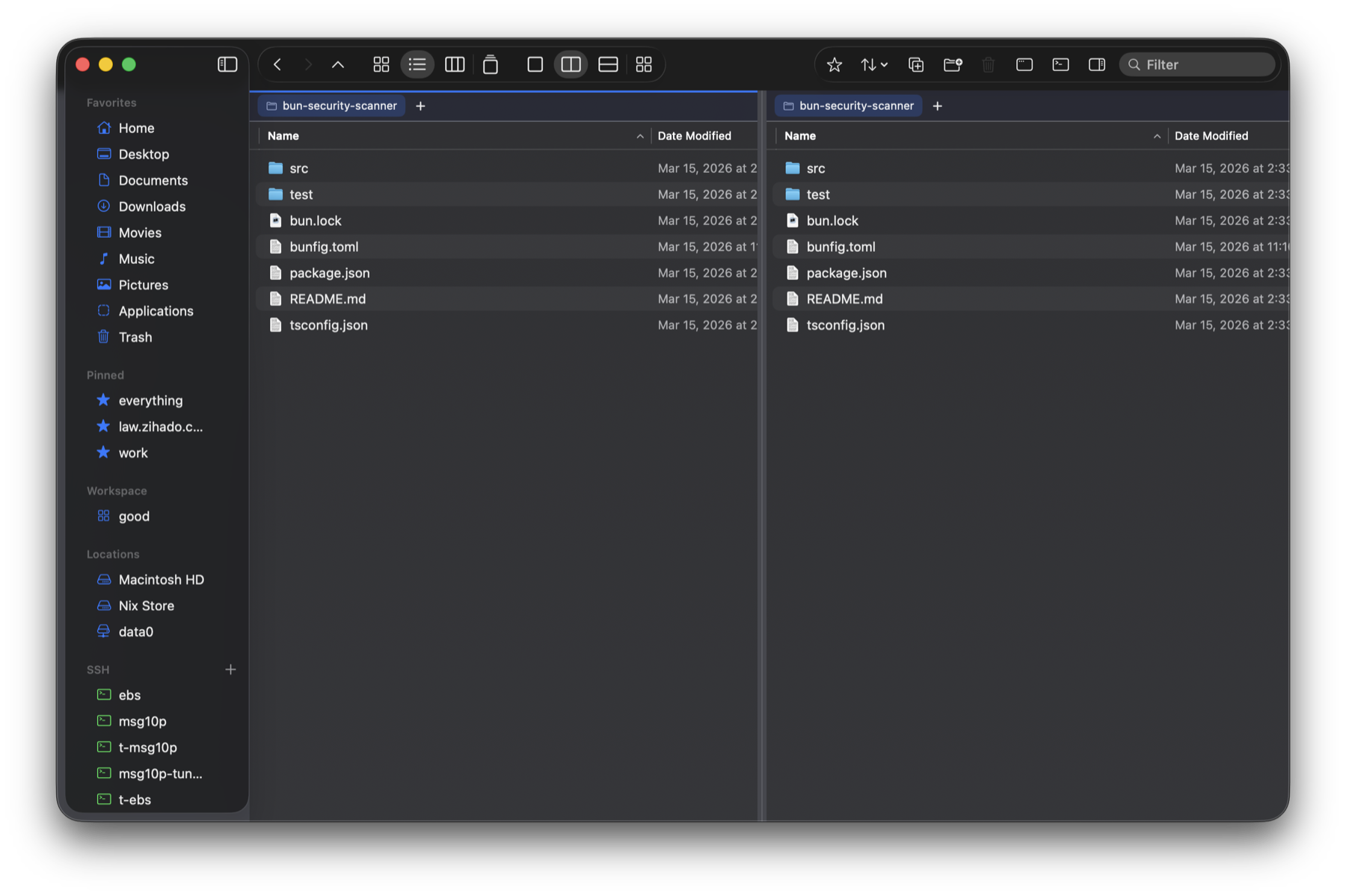
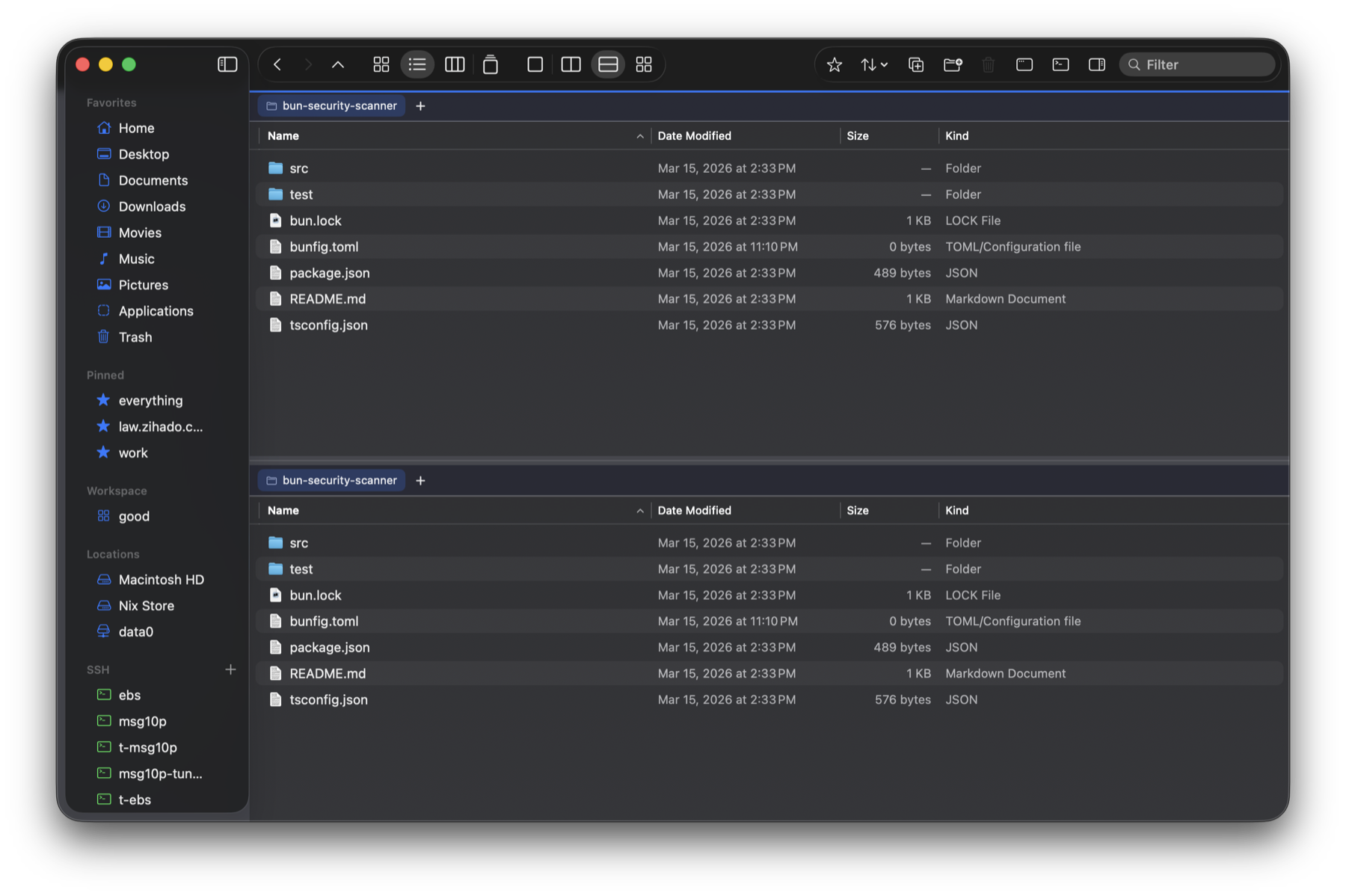
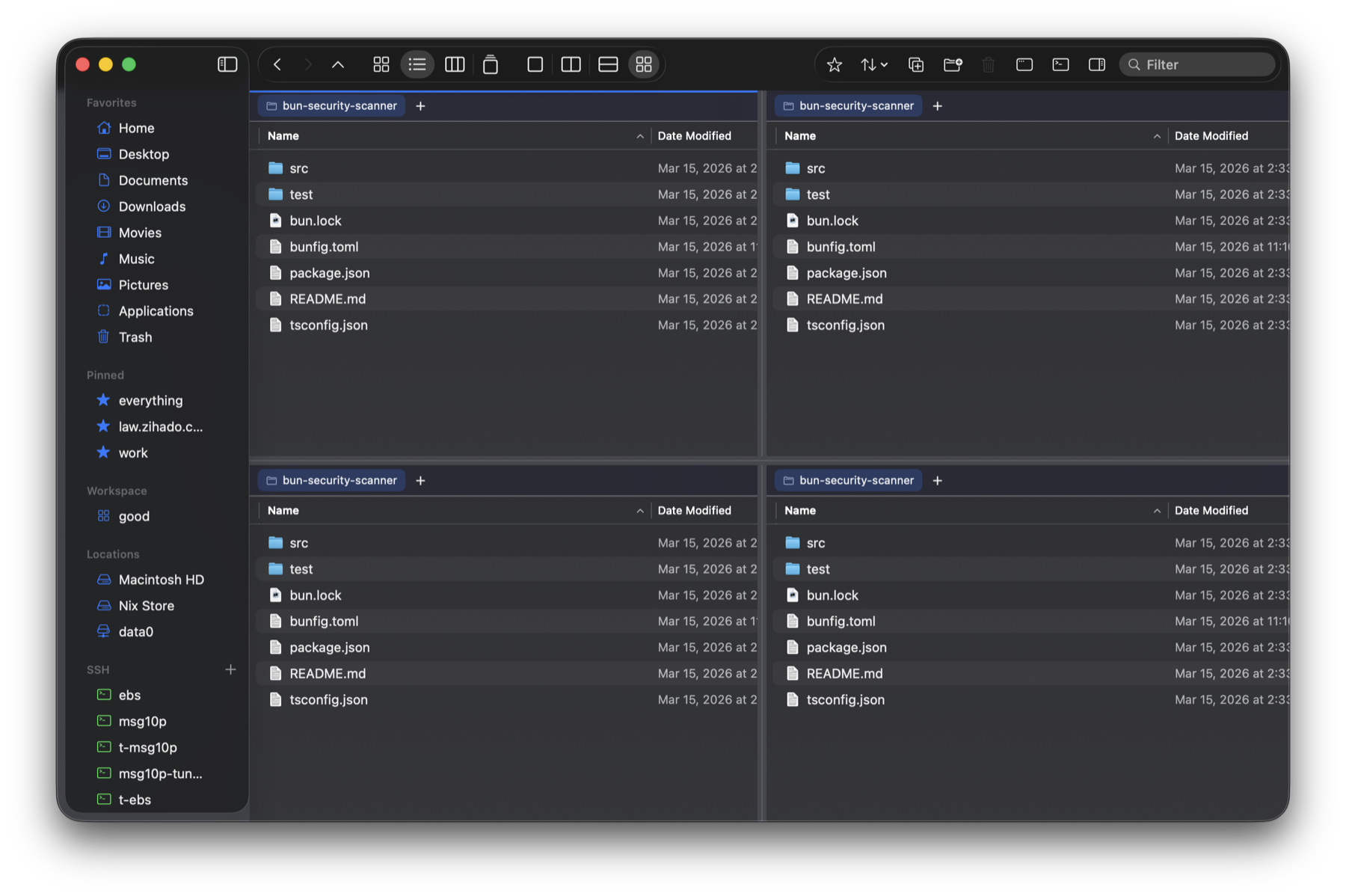
Single · two panes · two rows · four panes. Drag the dividers to resize — window position, layout and view modes are remembered without any setup.
Command palette
⌘K from anywhere. Instant name search under the focused folder via fd, content search via ripgrep — and jump straight to pins, recents and favorites.
Built-in terminal
A global drawer at the bottom of the window, running on a real PTY. Resize the font with ⌘±, connect to SSH hosts in one click.
iCloud, handled
Undownloaded placeholders get a cloud badge, and selecting one in the inspector downloads it automatically.
Inspector previews
QuickLook previews plus a readable text viewer. Adjust the text size with ⌘±.
Native sidebar
Favorites · pins · locations · SSH sections. Collapsible groups, automatic ~/.ssh/config parsing, live session indicators.
hwpx body text too
Extracts the body text of Korean hwpx as well as docx/pptx/xlsx/pdf — searchable from ⌘K and previewed in the inspector. No extra software.
Initial-consonant search
Type just ㄱㅊ to jump to "(경찰청)…" folders — in ⌘K or right inside a folder. With NFC/NFD normalization and shortcuts that work under the Korean IME. Korean-first, done properly.
Workspaces
Save the current split layout and tabs under a name, then jump back to that whole working arrangement from the sidebar.
Tags & Get Info
Classify with colour tags (fully interoperable with Finder), and ⌘⌥I shows size, permissions, path and dates at a glance. Folder sizes compute in the background.
GUI SFTP
Browse SSH hosts like regular folders. No terminal, no sshfs, no macFUSE — remote directories right in the window.
Why it's fast.
Speed is a design decision, not an accident. All numbers measured.
| Benchmark | Result | Notes |
|---|---|---|
| Bulk-read a 26,549-entry folder | 23.8 ms | getattrlistbulk — 46× faster than the old Foundation full-stat path (1,084ms) |
| Open that folder (read+sort+render) | ~0.1 s | first visit |
| Revisit the same folder | 0 ms | cached listing paints first, changes reconcile behind it |
| Sort 26,549 Korean names | 98 ms | packed-integer comparison — 5× over locale compare (480ms) |
| ⌘K fuzzy search (300k-path pool) | ~40 ms | per keystroke — in-memory index with 초성 matching; scrolling, arrows and sort flips stay instant via row recycling / O(1) maps |
| Content-search sweep over 32 PDFs | 410 ms → 4 ms | extracted once per session, then cached per keystroke |
| Copy a 55,860-entry (622MB) folder | 6.8 s | parallel APFS clones — faster than cp -Rc (8.4s), fully background with progress + instant cancel |
| Soak across 150,696 directories | 0 failures | a real home tree through the production read+sort path, all <55ms except the 26k outlier |
| App size | 5.8 MB | one native binary — a fraction of an Electron file manager |
| Memory | ~110 MB | with a 26,549-entry session open; live heap ~30 MB, every cache byte-capped |
| Idle CPU | ~0 % | the index refreshes only when needed |
Apple M4 Pro · macOS 26 · local APFS — network volumes (SMB/NAS) are bound by the wire. Harnesses, baselines and repro steps are public in PERFORMANCE.md and TESTING.md.
Native, no Electron
Swift + AppKit talking straight to the system frameworks. No browser runtime — fast startup, light memory.
fd · ripgrep in the background
Names are indexed in the background with fd (filtered in memory), content searched with ripgrep — no disk crawl per keystroke, and the index checkpoints to disk so it's warm after a restart.
Built-in fuzzy matching
Fuzzy ranking implemented directly in Swift — no external fzf process. It runs off the main thread, so typing never stutters.
AppKit controllers, not SwiftUI
The command palette drives NSPanel + NSTableView directly. Keyboard focus and performance problems SwiftUI couldn't solve are handled natively.
Any folder, in a blink
Folder entry uses the native getattrlistbulk(2) bulk read — names, kinds, sizes and dates in a few syscalls, no per-item stat. Typical folders open in 0.01s; even 26,000 entries take ~0.1s.
Native NSTableView rendering
The file list is drawn by NSTableView, not SwiftUI. Only visible rows are recycled, so scrolling, sorting and arrow keys stay instant at tens of thousands of items.
Debounce · timeouts
Search debounces at 130ms to avoid wasted work, and content search (ripgrep) has a 3s timeout and skips huge files — it never hangs.
Vibe-coded. Performance: not vibed
26,549-entry folder opens in ~0.1s · revisits 0ms · 26k Korean names sorted in 98ms · ~0% idle CPU. How it's verified: 124 unit/integration checks (keyboard selection, sorting, jamo matching, undo safety net), synthetic-event UI tests (divider drags and page keys through the real event path), a 150k-directory soak (every folder under a real home tree through the production read+sort path, zero failures), and benchmark baselines (folder entry, PDF body sweep — regressions fail before users feel them). All public in TESTING.md, run by CI on every push.
A terminal that never leaves the window.
A built-in terminal in a global bottom drawer — xterm.js rendering wired to a real PTY.
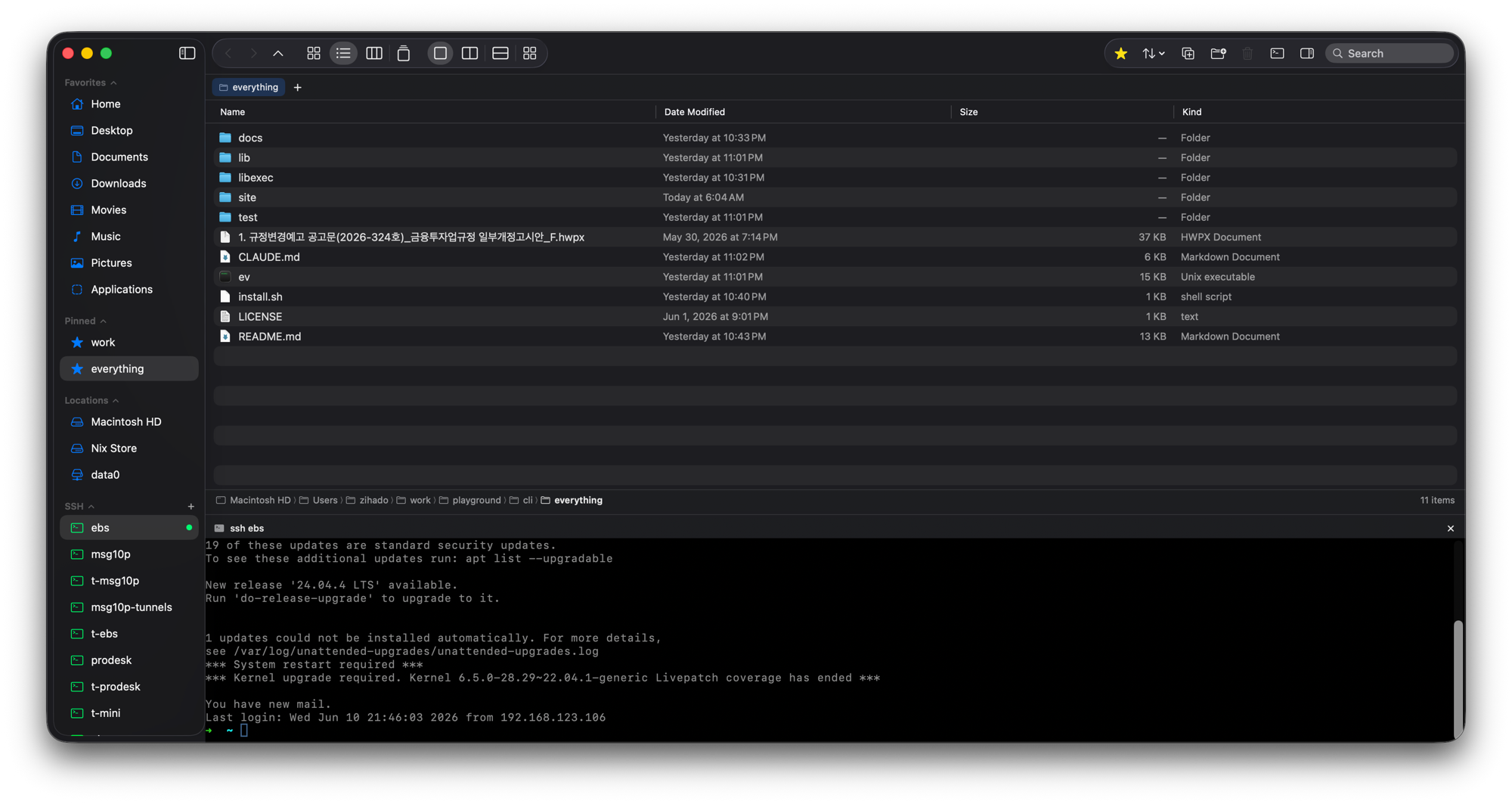
- Opens at about a third of the window — drag to resize
- ⌃` to toggle · ⌘+ / ⌘− for font size
- Click an SSH host in the sidebar to connect, with live session indicators
⌘K — results as you type.
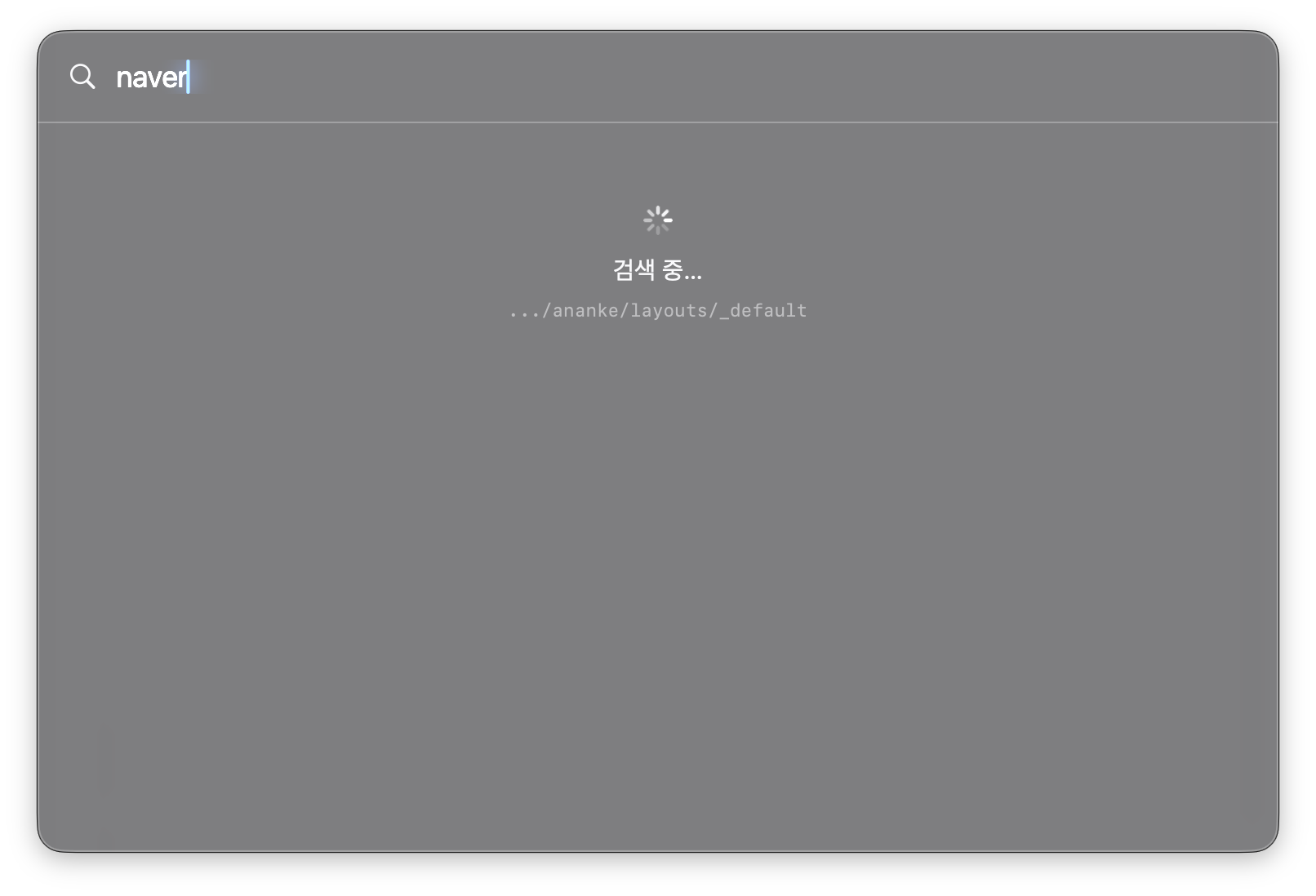
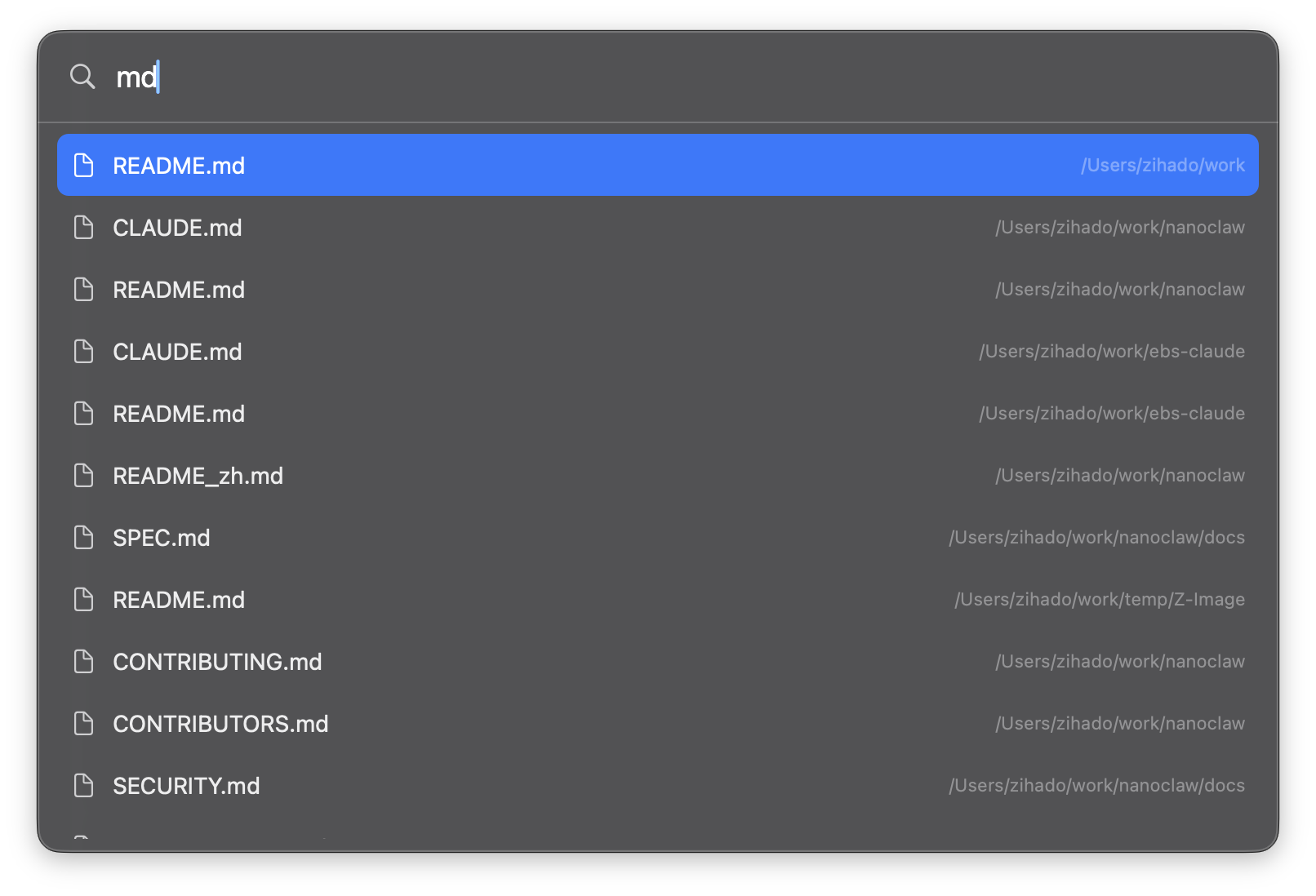
A pure-AppKit command palette. Hit ⌘K anywhere and results pour in the moment you start typing.
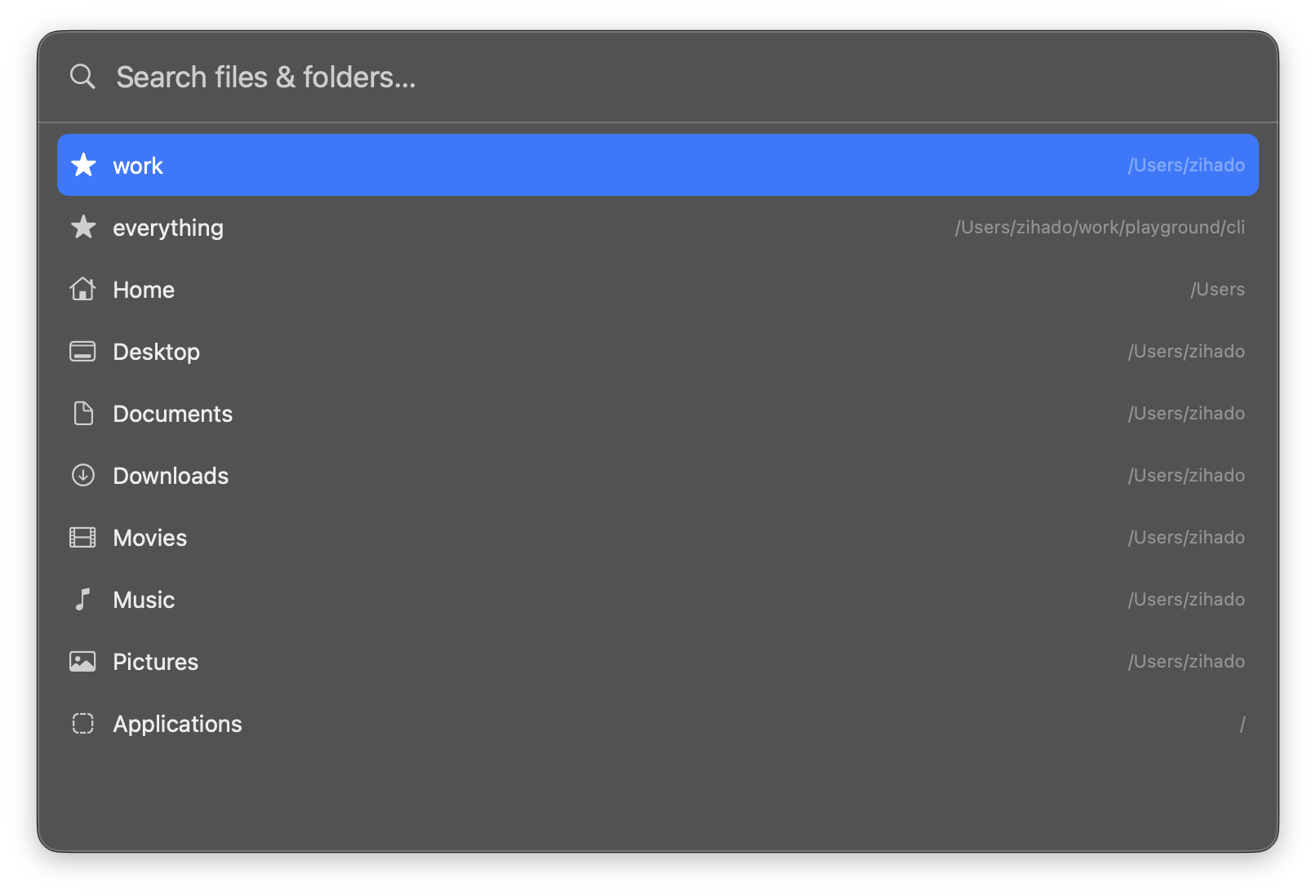
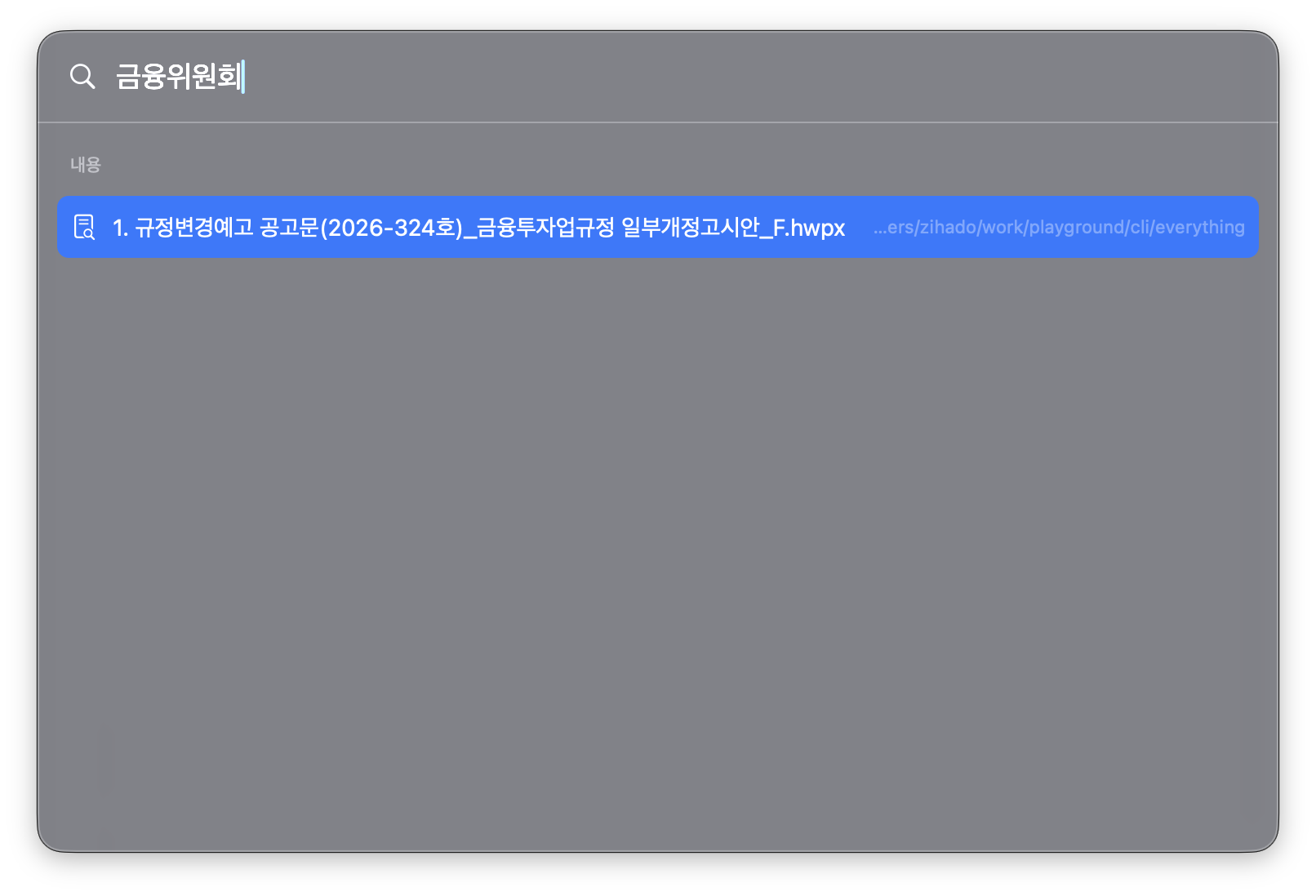
- Empty state: pins → recent folders → favorites
- Names search the focused folder's subtree instantly via fd (built-in fuzzy ranking)
- Korean initial consonants match — ㄱㅊ → (경찰청)…, narrowing as you type
- Content matches shown separately via ripgrep — including hwpx/docx body text
- Folders navigate; files jump to their location and select
Hands on the keyboard.
Every frequent action has a shortcut.
Search powered by fd + ripgrep.
fd finds names under the current folder instantly; ripgrep searches content. Fuzzy ranking is built in — see Install for setup.
fd
Blazing-fast filename search under the current folder.
ripgrep
Search file contents from the command palette.
alhangeul ↗
anf extracts HWP/HWPX body text by itself. alhangeul adds full rich QuickLook previews with formatting (optional).
Fuzzy ranking ships inside anf. Without fd/ripgrep it falls back to macOS Spotlight (mdfind), so search works with nothing installed. alhangeul is for Korean document previews.
Built on open source.
anf stands on these projects. Thank you.
Screen rendering for the built-in terminal. v5.3.0 bundled.
The system frameworks behind the windows, views and previews.
A small C helper that forks/execs the pseudo-terminal.
Built to be trusted.
Lose a file and it's gone. So safety here isn't a feature — it's the foundation.
Reversible file operations
Move, rename, copy and Trash all undo with ⌘Z. Overwrite sends the existing file to the Trash (recoverable) instead of deleting it; name clashes ask first.
Guarded by tests
147 unit/integration checks + synthetic-event UI tests + a 150k-directory soak. CI runs on every push, and every bug report becomes a regression test keyed to its exact input.
Leak & crash audited
Windows opened and closed dozens of times under heap and leaks. Event monitors, observers and window lifetimes are all tracked so nothing leaks.
Never beachballs
Big reads, sorts, copies and searches all run in the background. A main-thread stall detector turns "feels janky" into numbers, and the beachball spots are closed before they happen.
The full methodology is in METHODOLOGY.md; the test scenarios in TESTING.md.
Deleted files come back.
Protect a folder with Vault. Delete something by mistake — empty the Trash, even — and travel back to recover it intact.
Protect with one right-click
Mark a folder as a Vault and you're done. It snapshots quietly in the background every 5 minutes — ~0% idle CPU, with Git invisible underneath.
Safe even after emptying Trash
Empty the macOS Trash, force-delete from outside — the data survives, isolated inside the Vault. Zero cloud dependency; everything stays on your Mac.
One-click recovery from the timeline
Open the Vault Timeline, pick a point in time, and bring a vanished file back with a single click — any version, any moment.
- Built on a local git engine — zero new dependencies
- Dev projects (folders that already have a .git) are isolated in
.anf_vaultso your repo is never touched - Binaries over 50MB are side-channelled automatically so the store never bloats
On-device AI, when you turn it on.
Only when you want it, with the engine you choose. Off by default.
Summarize & Ask
Summarize a file or folder in 2–3 sentences (PDFs, documents, even image folders). Ask a document or folder questions in plain language and get grounded answers.
Image search
In ⌘K, search photos by what's in them — “dog”, “receipt” — and by text inside images (OCR). Scales to a 10,000-photo library.
Rename, tag, organize
Content-based name suggestions and automatic topic tags (real Finder tags). Organize a folder by kind or by content, and tidy scattered screenshots in one go.
- Backend is auto: Claude when an Anthropic key is set, else a local LLM (Ollama/LM Studio), else Apple on-device. Claude is cloud (content leaves your Mac); Apple & local stay on it. Claude's 1M-token context handles whole folders
- The Apple & local paths bundle no model and make no network calls — the “collect nothing” promise holds. Image search, OCR and tidy/organize-by-kind work below macOS 26 too
- It's a beta: result quality depends on the model you connect
Set up once — AI setup guide. Or just type / in ⌘K inside anf to start.
Your API key is kept safely in the macOS Keychain — never in plain text, and never sent to a server (anf doesn't have one).
Nothing is collected.
Privacy isn't a feature here — it's the default. And it's all verifiable in the source.
Zero telemetry
No usage stats, no crash reporting, no analytics, no ad identifiers — and no account to sign up for. Nothing collected means nothing to share.
Exactly one network request
A once-a-day version check against GitHub Releases — it carries no user data, and it silently skips when you're offline.
Everything stays on your Mac
Settings, the search index and caches live locally only. brew uninstall --zap --cask anf removes every trace.
It never knows your passwords
SSH/SFTP uses key/agent auth only — passwords are never asked for or stored. Diagnostic logging is off by default (opt-in).
Your API key lives in the Keychain
Your Anthropic API key is never stored in plaintext — not in the settings file, not anywhere on disk. It's kept only in the macOS Keychain. Enter it from the AI menu and it's saved there securely.
Details in the privacy policy — short enough to actually read.
Release notes.
Already installed? Update with a single brew upgrade --cask anf.
- v1.6.0–1.6.3
A more compact interface. Familiar workflows, more room for your files.
Consolidated toolbar commands, inspector actions anchored above previews, an opaque edge-to-edge sidebar, layouts that stay clear of overlap through resizes and full-screen transitions, the sidebar toggle pinned beside the window controls, sidebar selection and arrow controls restored near window edges, and selected sidebar items highlighted in the accent color.
- v1.5
On-device AI (summarize, ask, suggest name, auto-tag, organize, image search) and an inline list tree land.
- v1.5.11–1.5.19
A macOS-Finder-style tab bar, natural numeric sort for names (1, 2, …, 10, 11), a “Check for Updates…” App-menu item,
⌃`opens a shell in the current folder (even with an SSH tab open), file actions keep focus on their result plus tidied favorites paths, Enter renames the selected item while Return on the..row goes up, terminal CJK font, palette & status-bar keystroke perf, and a notarized .dmg (drag-to-Applications) build. - v1.5.10
Apple-notarized: signed with a Developer ID and notarized, so the first launch has no Gatekeeper warning.
- v1.5.5–1.5.9
Windows-Commander-style
..parent row, pin a tab to a folder (★), inline path editing (⌘L), the Delete key (⌦) trashes, tab-switch list refresh, Enter on the delete-confirm dialog, persistent column widths, dual-split ratio (%) readout, and network & Vault hardening. - v1.5.4
Recents & Smart Folders (virtual sidebar locations), Arrange-By group headers (list & icon views), and your Anthropic API key now lives in the macOS Keychain (set it from the AI menu; any plaintext key is migrated automatically). Steadier network-drive reconnects, list drag-and-drop moves, and Go-to-Folder.
- v1.5.0
AI features (opt-in): summarize, Q&A, smart rename, auto-tag, organize by kind/content, image search. Pick the backend — Claude, a local model (Ollama/LM Studio), or Apple on-device. Press
/in ⌘K to ask. Inline folder tree in list mode, ⌘? shortcuts, F4 open-with, Esc-closable panels, JSON migration for pins & workspaces. - v1.0.3
Sidebar favorites now navigate only the focused pane while split (previously both panes changed).
- v1.0.2
Adds macOS 14+ (Sonoma/Sequoia) support; the single macOS 26-only API (writing Finder tags) replaced with the long-standing NSURL spelling.
- v1.0.1
Fixes a terminal/SSH crash (missing resource bundle), much faster ⌘1–4 pane switching (188ms → 31–54ms), Vault from more right-click spots.
Speed
getattrlistbulk(2)bulk reads — a 26,000-entry folder opens in ~0.1s, revisits in 0ms- List, icon grid and sidebar all native AppKit — instant scrolling and sorting at tens of thousands of items
- ~0% idle CPU; bounded thumbnail generation and a sidebar that doesn't rebuild on navigation
Search
- ⌘K palette — names via fd + built-in fuzzy ranking, content via ripgrep (falls back to Spotlight without them)
- Korean initial-consonant search and hwpx·docx·pdf body-text search, no extra software
- NFC/NFD normalization; jump to SSH hosts and Workspaces from the palette
Windows · Keyboard
- Multiple windows (⌘N) · single/two/four panes · named Workspaces
- Type-to-select, Shift+arrow block selection, PgUp/PgDn paging, F5/F6 copy/move across panes
- ⌘ shortcuts that work under the Korean IME, a first-run shortcut card
File operations
- Extract zip·7z·tar.gz·cpio and more with no extra install (rar·alz via unar); zip compress
- ⌘Z undo (move, rename, Trash), conflict dialogs, background copy faster than cp
- Get Info (⌘⌥I) and colour tags (Finder-compatible); status bar shows item count and free space
Remote · Privacy
- GUI SFTP — browse SSH hosts like folders (no sshfs); built-in terminal (real PTY, multiple tabs)
- Automatic ~/.ssh/config parsing; passwords are never asked for or stored (key/agent auth)
- Zero telemetry — the only request is a once-a-day version check; EN/KO UI; MIT open source
Vault
- Vault — protect a folder and recover files even after emptying the Trash
- Background snapshots every 5 minutes, local only, no cloud
- Built on local git — zero new dependencies; dev folders isolated in .anf_vault
Like what you see?
Ideas, feedback and bug reports: GitHub Issues or tellme@duck.com.